01 · The owner’s operating view
Run the moving parts without losing sight of the academy.
People, catalogue, bookings, finance, communications, public content and policy live inside one connected management system.
Less operational sprawl. More time to improve the academy.
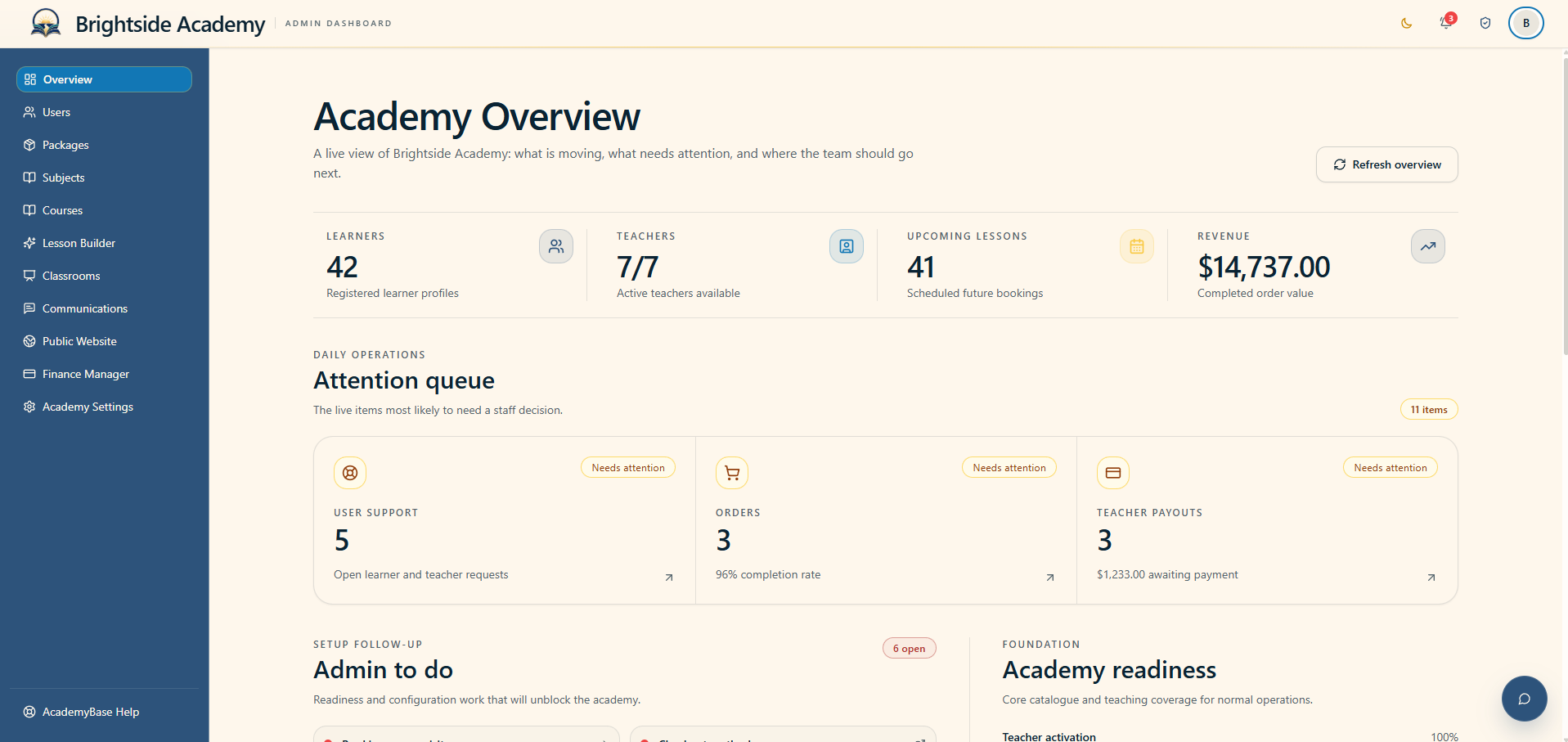
Know where to look first
A clear read on today, this month and what needs attention.
The academy overview gathers useful operational signals without turning the first screen into a wall of reports. Owners can see activity, readiness and the work that needs a decision.
- Top-level academy activity
- Attention and readiness queues
- Upcoming lessons and recent requests
People stay connected to the work
Manage teachers and learners with the right context close by.
User records are separated by role and connect directly to the actions an academy administrator actually needs—profile review, activation, calendars, bookings and booking details.
- Teacher and learner workspaces
- Activation and profile controls
- Calendar and booking oversight
Define what the academy teaches
Subjects become the foundation for pay, progress and presentation.
Subject management brings the academy’s teaching catalogue into a consistent structure, including visibility, teacher pay terms and the proficiency language used to describe learner progress.
- Active subject catalogue
- Teacher pay terms and acceptance
- Custom proficiency levels
Turn teaching into a clear offer
Shape credit packages around subject, audience and buying style.
Packages can be organised for the people and subjects they serve, with control over price, credits, availability, rollover and how each offer appears in the learner shop.
- Once-off and recurring offer styles
- Credit duration and package features
- Built-in pricing context
Build a path through the learning
Create courses, sequence lessons and keep material ready for class.
Course tools move from subject selection to a structured course and its lesson material. The result is a catalogue learners can understand and a lesson sequence teachers can use.
- Subject and audience organisation
- Course and lesson sequencing
- Material upload for classroom use
Keep communication actionable
Support requests and announcements share one organised desk.
Academy teams can triage incoming support, surface time-sensitive issues and compose branded announcements for the audience that needs them.
- Prioritised support queue
- Audience-aware announcements
- Academy-branded communication
See teaching in progress
Active classrooms stay visible when the academy needs to help.
Administrators have an operational view of live classrooms so they can respond to support needs and carry out appropriate teaching oversight.
- Live lesson directory
- Participant and lesson context
- Support-oriented classroom access
Keep the public story current
Manage the academy website from the academy behind it.
Published courses, packages, FAQs and testimonials stay connected to academy-managed content, while status and analytics tools make public presentation easier to maintain.
- Published-change visibility
- FAQ and testimonial management
- Consent-aware visitor analytics
Follow the money without losing the history
Financial activity, teacher pay and referral performance belong together.
The finance workspace covers everyday orders, teacher obligations, configured payment methods, referral programmes and permanent movement logs for review and audit.
- Orders and performance
- Teacher payments and policies
- Referral and audit records
Make the system feel like your academy
Identity, teaching policy and legal documents stay intentional.
Academy settings bring together the decisions that shape how the school looks, who it serves and how bookings, trials, support and legal information should behave.
- Name, logo and themes
- Audience, timing and trial policy
- Support contact and legal documents
Help beyond day-to-day academy support
Reach AcademyBase with the product context already attached.
Academy owners can ask AcademyBase about a technical issue, a product question or a feature request without mixing that work into learner and teacher support.
- Technical help
- Product questions
- Feature requests
Ready when you are
See the system. Then shape the academy inside your account.
Create an account, enter your private dashboard and start an academy plan when you are ready. Your public visit never becomes an exposed application form.